
If your business still relies on passwords alone to protect email accounts, cloud applications, and remote access, you are operating with a significant security gap. Passwords are no longer enough, and have not been for some time.
Multi-factor authentication, or MFA, is one of the most effective and straightforward security controls available to small businesses. It is also one of the most consistently skipped, usually because it seems like extra friction or something only larger organizations need to worry about.
Neither of those assumptions holds up.
What Multi-Factor Authentication Does
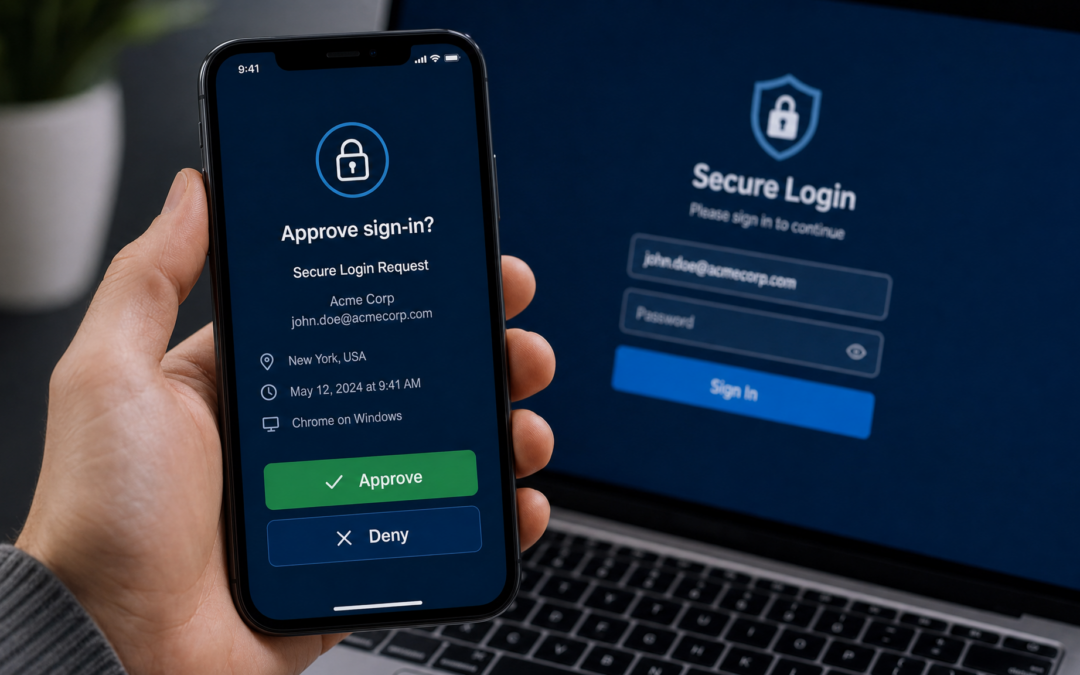
Multi-factor authentication adds a second verification step to the login process. After entering a username and password, the user must confirm their identity a second way, typically by approving a notification on their phone or entering a short code from an authenticator app.
The idea behind MFA is simple. A password can be stolen, guessed, or exposed in a data breach without the account owner knowing. But a stolen password alone is not enough to get in if MFA is enabled. The attacker would also need access to the second factor, which in most cases means the user's phone.
This single additional step stops the majority of account takeover attempts.
How Common Are Credential-Based Attacks
Credential theft and account compromise are among the most common ways small businesses are breached. Phishing emails that trick employees into entering their passwords on fake login pages are sent by the millions every day. Password reuse means that a breach at one website can expose accounts at many others.
Business email compromise, where an attacker gains access to a real employee email account and uses it to request fraudulent payments or gather sensitive information, costs businesses billions of dollars every year. Most of these attacks start with a compromised password.
MFA does not prevent phishing emails from arriving. But it does prevent a stolen password from being immediately useful to an attacker.
Why Small Businesses Are Targeted
There is a common belief that small businesses are too small to attract attention from cybercriminals. This is not how modern attacks work.
Most attacks targeting small businesses are not targeted at all. They are automated, opportunistic, and run at scale. Attackers scan for exposed credentials, send phishing emails to thousands of addresses at once, and let the automation do the work. Small businesses end up in these campaigns the same way large businesses do.
The difference is that small businesses often have less protection in place, which makes them easier to compromise once a credential is obtained.
What Happens Without MFA
When an employee account is compromised without MFA protection, the attacker typically has full access to everything that account can reach. In a Microsoft 365 environment, that can mean email, calendar, contacts, OneDrive files, SharePoint documents, and any other connected applications.
From inside a real employee email account, attackers can:
- Read existing emails to understand business relationships and payment processes
- Send emails impersonating the employee to vendors, clients, or colleagues
- Request invoice changes or wire transfers that appear to come from a trusted internal source
- Access files and documents stored in cloud platforms
- Reset passwords on connected accounts
- Move laterally to other systems if credentials are reused elsewhere
Recovery from a business email compromise incident is time-consuming, expensive, and sometimes results in financial losses that cannot be recovered.
Microsoft 365 and MFA
Microsoft 365 is the most common cloud platform for small business email and collaboration, and it is also one of the most frequently targeted by attackers. Microsoft has reported that enabling MFA blocks over 99 percent of automated account attacks against Microsoft 365 accounts.
Despite this, many small business Microsoft 365 environments are still running without MFA enabled for all users, or with MFA set up inconsistently where some accounts are protected and others are not.
A full MFA rollout for a small business typically takes a few hours and can be done with minimal disruption to employees.
Cisco Duo Makes MFA Manageable
One of the challenges businesses face with MFA is making sure it is deployed correctly, works reliably, and does not create excessive friction for employees.
Cisco Duo is an MFA solution designed to be straightforward for both the IT team and the end users. Employees receive a push notification on the Duo Mobile app and tap Approve to complete their login. It works across Microsoft 365, VPNs, remote access tools, and many other applications your business may use.
Duo also provides visibility into which devices are accessing your accounts, flags unusual login patterns, and gives administrators control over access policies.
Beyond Email: Protecting All Your Critical Access Points
MFA should not be limited to email. Any system that handles sensitive data or provides access to your business infrastructure is worth protecting with a second factor.
This includes VPN and remote access, accounting and financial software, cloud storage platforms, customer relationship management tools, and any web-based application that holds customer or business data.
A consistent MFA policy across all critical systems significantly reduces the overall attack surface of your business.
Common Objections and the Reality
**It adds too many steps for employees.** The extra step in a modern push-based MFA system takes about three seconds. This is a reasonable trade-off compared to the time and cost of recovering from a compromised account.
**We are too small for this to matter.** Automated attacks do not distinguish by business size. If your credentials are exposed, the attempt to access your accounts happens within hours.
**Our passwords are strong enough.** Strong passwords do not protect against phishing, credential stuffing, or data breaches at third-party services where your employees reused passwords.
**Our insurance covers us.** Many cyber insurance policies now require MFA as a condition of coverage. Businesses that experience a breach without MFA in place have had claims denied.
Getting Started
Enabling MFA for your business does not require a large project or a significant budget. For most small businesses, a phased rollout starting with Microsoft 365 and email accounts is the right starting point, followed by extending coverage to other critical systems.
The right IT partner can assess your current environment, recommend the appropriate MFA solution, and handle the deployment with minimal disruption to your team.
AVS Technologies Can Help Protect Your Business
AVS Technologies provides Cisco Duo multi-factor authentication deployment and management for small businesses in the Atlanta area. We also provide broader cybersecurity support including endpoint protection, managed firewall services, and Microsoft 365 security configuration.
If your business does not have MFA in place yet, or if you are not sure whether your current setup is configured correctly, contact AVS Technologies to schedule a free consultation.